Excel's row limit, and what to do when you hit it
By Celtrim · Updated

A modern Excel sheet holds 1,048,576 rows and 16,384 columns. The last cell is XFD1048576, and there is nothing you can configure, license, or upgrade to move that ceiling.
Where the number comes from
1,048,576 is 2²⁰ and 16,384 is 2¹⁴. The limits are not a product decision so much as the shape of the addressing scheme Excel adopted in 2007, when the format changed from .xls to .xlsx.
The previous generation was much smaller: 65,536 rows and 256 columns, or 2¹⁶ and 2⁸. If you open an old .xls file, or a file someone saved in compatibility mode, you inherit those limits — which is why a file can refuse rows at 65,536 on an Excel that supports a million. The status bar or the Save dialog will mention compatibility mode if that is what is happening.
Google Sheets, for comparison, allows 10 million cells across the whole document rather than a fixed row count, so a two-column sheet gets far more rows than a fifty-column one.
The limit you will hit first is not the row count
Most people never reach a million rows. They hit memory long before that.
A sheet with 400,000 rows and thirty columns of formulas will make Excel unresponsive on a normal laptop while sitting at less than half the row limit. Volatile functions like OFFSET, INDIRECT, and NOW make it worse, because they recalculate on every change. Whole-column references such as =VLOOKUP(A:A, ...) do the same.
If Excel has become slow rather than refused a row, the row limit is not your problem. Recalculation is.
What happens when a file is bigger than the limit
Opening a CSV with more than 1,048,576 rows does not fail. Excel loads the first 1,048,576 and shows a message saying the file was not loaded completely. Click through it in a hurry and you now have a truncated dataset that looks entirely normal — no gap, no marker, just an ending where the data happened to stop.
This is the single most dangerous thing about the row limit. A file that is too big does not break; it quietly gets shorter. If you are working with an export that might be large, check the row count in the file before you trust the sheet.
You can see the true size without opening it in Excel at all — a browser-based reader will tell you how many rows a sheet holds, though very large files are paged there too.
What to do when you actually have too much data
Load it to the data model instead of the grid. Power Query (Data → Get Data) can pull a file with tens of millions of rows into Excel's data model, which is not bound by the sheet limit. You cannot scroll through the rows, but you can pivot, aggregate, and chart them — which is usually what the rows were for.
Aggregate before you import. If the source is a database, ask it for the summary. A GROUP BY returning 4,000 rows beats a million rows you were going to summarise in Excel anyway.
Split the file. For data that genuinely has to be inspected row by row, splitting by month, region, or whatever dimension the analysis follows keeps each file workable. Splitting the workbook by sheet is a related job: converting the workbook to CSV gives you one file per sheet, which is often the cleaner starting point.
Use something that is not a spreadsheet. At a few million rows, a database, DuckDB, or a pandas script will do in seconds what Excel does in minutes, if it does it at all. This is not a defeat — it is the point where the tool has genuinely changed.
Column limits are a different kind of problem
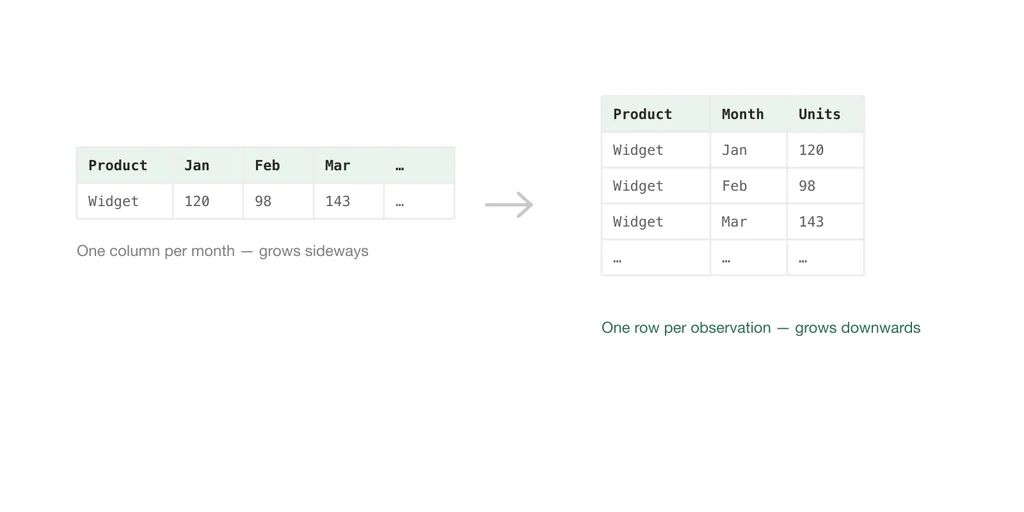
Hitting 16,384 columns almost always means the data is stored wrong rather than that it is large. Wide data — one column per day, per product, per respondent — is a presentation shape, not a storage shape. Converting it to long format, one row per observation, typically shrinks the column count to single digits and makes every subsequent pivot easier.
The numbers, for reference
| Limit | Modern (.xlsx) | Legacy (.xls) |
|---|---|---|
| Rows per sheet | 1,048,576 | 65,536 |
| Columns per sheet | 16,384 | 256 |
| Last cell | XFD1048576 | IV65536 |
| Characters per cell | 32,767 | 32,767 |
| Sheets per workbook | Limited by memory | Limited by memory |
A CSV file, worth noting, has no row limit of its own. It is a text file — it can hold a billion lines. The ceiling only appears when something tries to open it, which is one of the more useful differences between the two formats.