CSV vs Excel: which format should your data live in?
By Celtrim · Updated
The two formats get compared as if they were competitors. They are not — one is a filing cabinet and the other is a shipping envelope. Most of the confusion about which to use comes from asking a format to do the job of the other one.
What each file actually contains
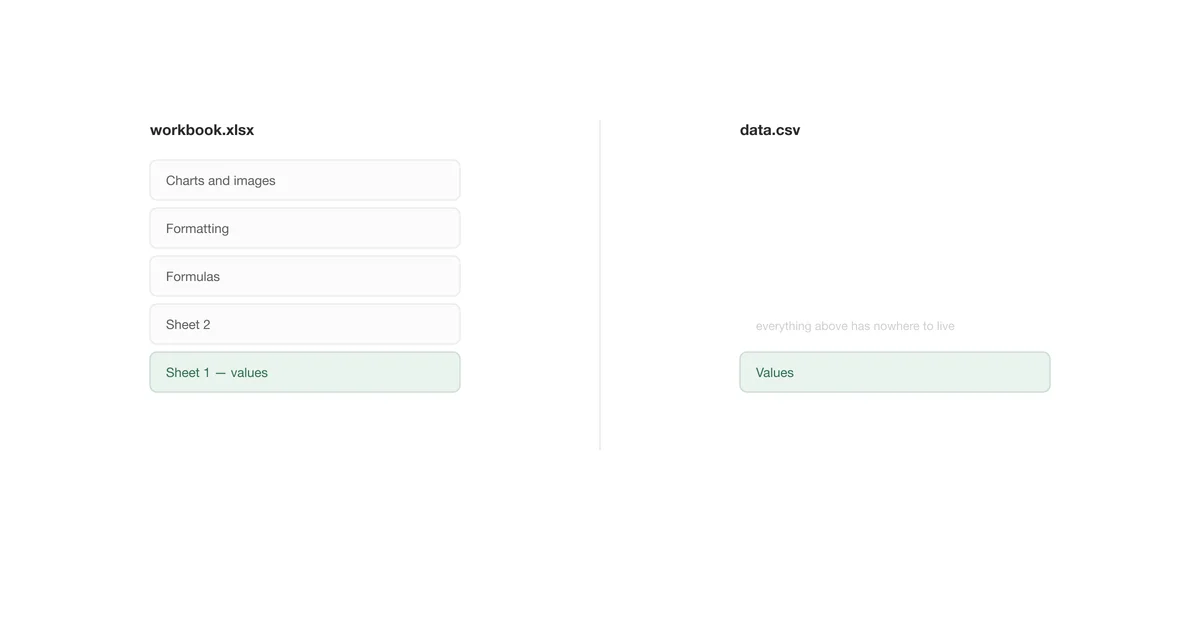
An .xlsx file is a zip archive full of XML. Inside are the cell values, but also the formulas that produced them, the number formats, fonts, fills, borders, column widths, every sheet in the workbook, charts, pivot caches, defined names, data validation rules, and any macros. It is a small application state, saved to disk.
A .csv file is a text file with separators between the columns. One table, values only, no types.
Everything else follows from that difference.
What you lose going to CSV
Converting a workbook to CSV is a lossy operation, and it is worth knowing exactly what falls off:
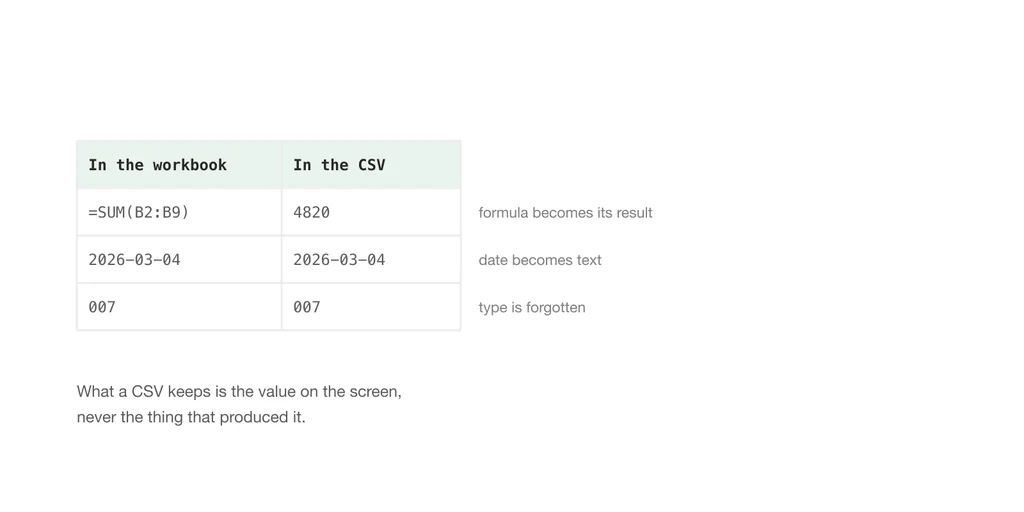
- Formulas become their last result.
=SUM(B2:B9)is saved as4820. The calculation is gone; the number stays. - Every sheet but one. CSV holds a single table, so a twelve-tab workbook needs twelve files.
- All formatting. The red-for-negative rule, the merged title cell, the column widths you spent ten minutes on.
- Cell types. The file can no longer say that
007is a code and not the number seven. - Charts, images, and macros, which were never cell data to begin with.
None of that is a flaw in CSV. It is what a format designed to be readable by anything has to give up.
What you gain going to CSV
- Anything can read it. A twenty-year-old system, a Python script, a database import, a language you have never heard of.
- It is small. Text with no styling compresses well and carries no overhead.
- It diffs. Put a CSV in git and you can see exactly which rows changed between two versions. Put an
.xlsxin git and you get "binary files differ". - Nothing hidden. No macro, no external link, no stale pivot cache. What you see in a text editor is the entire file.
- No row ceiling. The format has no limit of its own; only whatever opens it does.
Where Excel is the right answer
Keep the data in .xlsx when the work is still happening. Formulas that need to recalculate, a model someone will keep editing, a report where the formatting carries meaning, anything with more than one related table — all of that belongs in a workbook. Stripping it to CSV to "keep things simple" throws away the work and gives you nothing back.
Excel is also simply better at being read by humans. Frozen headers, column widths, and number formats exist because a wall of raw values is hard to check.
Where CSV is the right answer
Use CSV when the data is leaving. Feeding another system, handing a table to a colleague who will import it somewhere, archiving a snapshot, committing a dataset alongside code, or moving something between two tools that share no other format — these are all cases where the receiving end wants values and nothing else.
The useful rule: CSV is a transport format, not a storage format. Produce it at the moment of handover, from a source of truth that lives somewhere else.
Size and speed
Excel stops at 1,048,576 rows per sheet. A CSV has no such limit, but that only means the file can be bigger than Excel can open — the ceiling moves from the format to the program. A three-million-row CSV opens fine in a database, a script, or Power Query, and truncates silently at the limit if you double-click it. If you are anywhere near that scale, the row limit is worth understanding properly before you pick a format.
Below that, xlsx files are usually smaller than the equivalent CSV, because the zip compression more than pays for the XML overhead.
Which to pick, in one table
| If you need to… | Use |
|---|---|
| Keep formulas that recalculate | Excel |
| Send data to another system | CSV |
| Track changes in version control | CSV |
| Preserve formatting and multiple sheets | Excel |
| Open it on a machine with no Office | CSV |
| Hand a colleague something to edit | Excel |
| Archive a snapshot of the numbers | CSV |
Moving between them without damage
Going from a workbook to CSV, the decisions that matter are which sheet, which separator, and which encoding. The XLSX to CSV converter makes each of those an explicit choice and can export every sheet at once, rather than silently taking the active one the way a Save As does.
Coming the other way, the risk is different: a CSV has no types, so whatever imports it decides what your data means. Building the workbook from the text directly lets you settle that first — which columns stay text, which dates are real dates — instead of repairing a column afterwards.
If you are still deciding whether the file you have is even a real CSV, the format is worth five minutes.