What is a CSV file?
By Celtrim · Updated
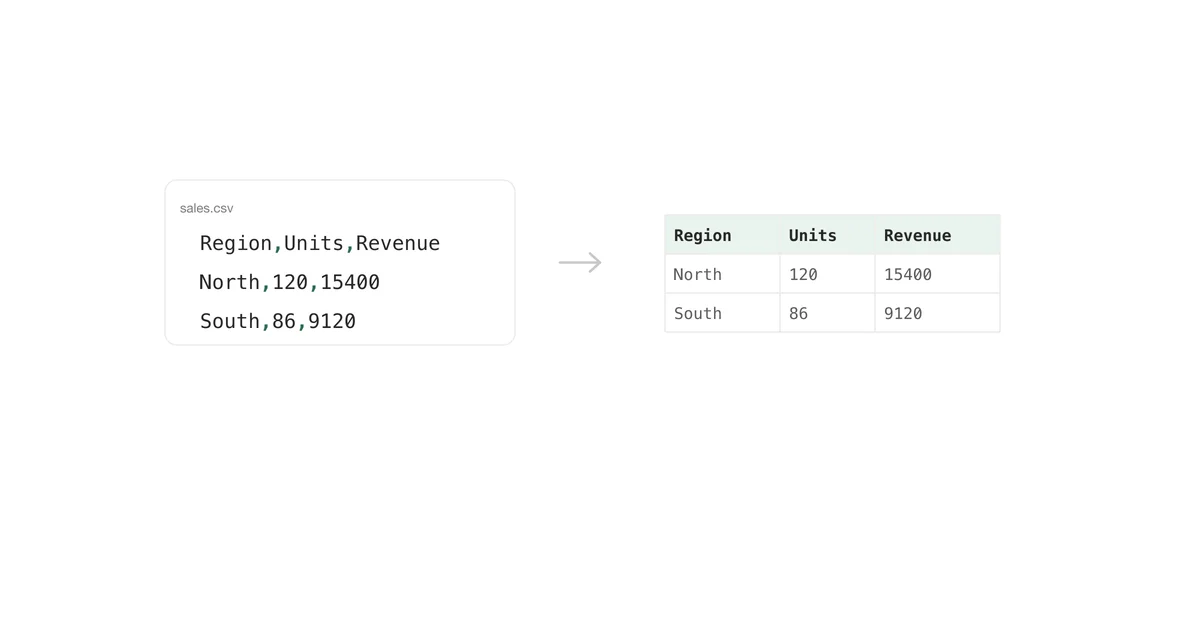
Someone sends you a file ending in .csv, you double-click it, and either Excel opens a tidy table or you get a wall of text with commas in it. Both are the same file. Understanding why explains most of the trouble people have with the format.
CSV stands for comma-separated values
A CSV file is a plain text file. If you open one in Notepad or TextEdit, you see exactly what is stored — there is nothing else in there:
Region,Units,Revenue
North,120,15400
South,86,9120
Each line is a row. Within a line, commas mark where one column ends and the next begins. That is the entire format. There is no hidden layer, no header block, no metadata — which is precisely why it has outlived nearly every other data format from the 1970s.
The spreadsheet-looking grid you see in Excel is not in the file. Excel is drawing that grid from the commas, the same way it would draw it from any other separator you told it to use.
What a CSV cannot hold
Because it is only text and separators, a CSV has no room for most of what people think of as a spreadsheet:
- No formulas. If a cell held
=SUM(B2:B9), the CSV contains whatever that summed to, not the formula. - No formatting. Colours, fonts, borders, column widths, and conditional formatting have nowhere to live.
- No multiple sheets. One CSV file is exactly one table. A workbook with twelve tabs becomes twelve CSV files, or eleven of them get lost.
- No charts, images, or macros.
- No cell types. A CSV cannot say "this column is text". Whatever opens the file decides that, which is where leading zeros go to die.
That last one causes more damage than the rest combined. A product code of 007 is just three characters in the file. Excel reads it, decides it looks numeric, and shows you 7.
The rule that makes it work: quoting
The obvious problem with commas as separators is data that contains commas. The format handles it by wrapping such a field in double quotes:
Region,Note,Revenue
North,"Strong quarter, ahead of plan",15400
The quotes are not part of the value — they tell the reader to ignore separators until the closing quote. Three rules follow from that, and they are the whole of RFC 4180 in practice:
- A field containing the separator, a line break, or a double quote must be quoted.
- A double quote inside a quoted field is written twice:
"say ""hi"""meanssay "hi". - A quoted field may contain actual line breaks, so a "line" in the file is not always a row.
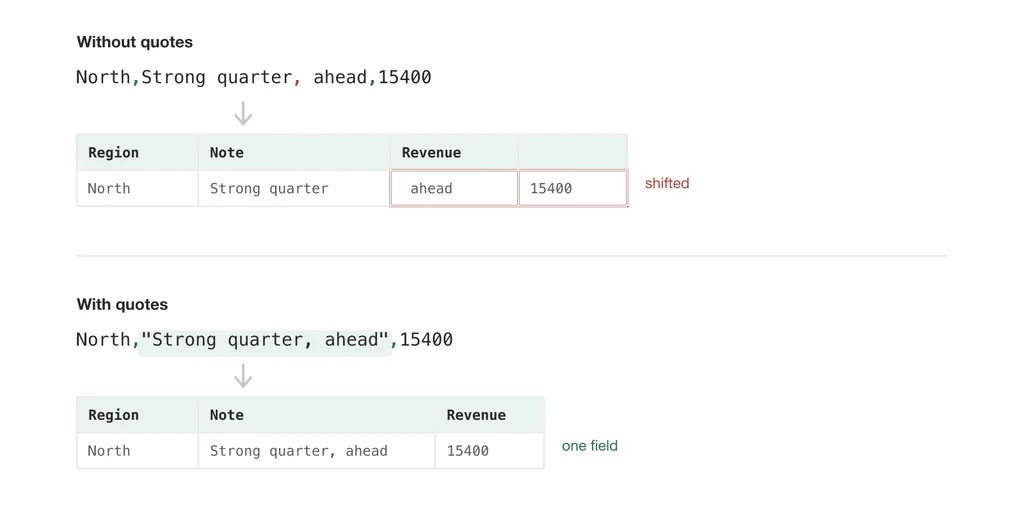
Files written by hand, or by a script that used string concatenation, routinely break these rules. That is the usual reason a CSV imports with columns shifted from row 40 onwards: one unquoted comma, several hundred rows ago.
Comma-separated files that are not comma-separated
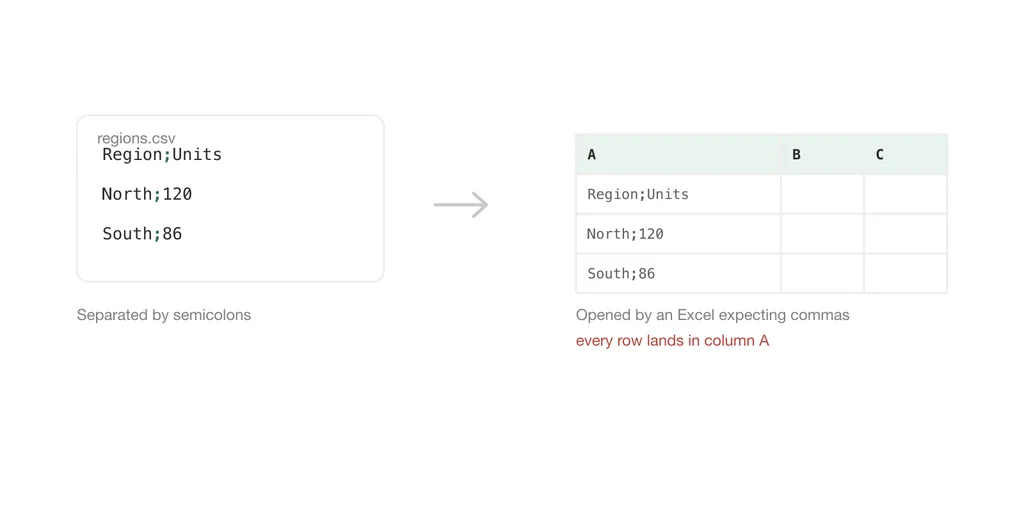
The name lies fairly often. The same format is used with semicolons, tabs, or pipes as the separator, and the file is still called a CSV.
Semicolons are the common case. In countries where the decimal mark is a comma, 1,5 means one and a half, so a comma cannot also separate columns — Excel there writes and expects ;. This is why a colleague in Warsaw or Berlin opens your file and finds every row crammed into column A. Nothing is corrupted; their Excel is looking for a separator that is not there.
Tab-separated files usually get the extension .tsv, but plenty of exports use .csv anyway.
Encoding, and why names come out as März
A text file also has to say which bytes mean which characters, and CSV has no place to record that either. Almost everything writes UTF-8 today. Excel, on the other hand, has historically guessed at a legacy code page unless the file begins with a byte order mark — three invisible bytes that mean "this is UTF-8".
With the mark, accented characters and emoji survive. Without it, Excel may render März as März. If you have ever "fixed" a file by retyping the names, this was the cause.
When you will meet one
CSV is the lowest common denominator of data exchange, so it shows up whenever two systems that know nothing about each other need to trade a table: a bank statement export, a Shopify product list, a CRM contact dump, a database query result, an analytics download. Nearly every system can write one and nearly every system can read one, which is the whole point of using a format this limited.
Opening one without breaking it
Double-clicking a CSV opens it in Excel, and Excel immediately applies its guesses — separators, encoding, and cell types all decided before you see anything. For a file you only need to read, that is a lot of interpretation you did not ask for.
If you just want to see what is in it, open the file in a browser-based reader instead. It shows the parsed rows without changing anything and without the file leaving your machine.
If you need the data to become a proper spreadsheet with types you control, build an .xlsx workbook from it, where you decide what stays text before Excel gets a chance to guess.
And if you are going the other direction — you have data as text and need a CSV that other systems will actually accept — the text to CSV converter applies the quoting rules above rather than trusting you to remember them.
The short version
A CSV is a text file where a separator marks the columns and quotes protect the fields that contain that separator. Everything people find frustrating about the format — vanished zeros, columns in the wrong place, mangled accents, one sheet out of twelve — comes from something guessing at what the file did not say. The fix is always the same: decide those things yourself instead of letting the guess happen.